Most advice on how to improve Quality Score treats your Google Ads Quality Score as a number to push up. Google treats it differently. The 1–10 score in your account is a diagnostic: it tells you which part of the ad experience is letting a keyword down, so you know where to work. Read it that way and the fixes get much clearer.
What is Google Ads Quality Score?
Google Ads Quality Score is a 1–10 rating of how relevant and useful your ad and landing page are to someone searching for a keyword, compared with other advertisers bidding on it. Google calculates it per keyword, from the combined performance of three components. Each one is rated above average, average, or below average:
- Expected CTR: how likely your ad is to be clicked when it shows for that keyword.
- Ad relevance: how closely your ad matches the intent behind the search.
- Landing page experience: how relevant and useful your landing page is to the person who clicked the ad.
Google doesn’t publish how the three components are weighted, and it doesn’t set a target score. The component ratings matter more than the headline number, because they tell you what to fix.
Why does Quality Score matter?
The single most important fact about Quality Score is one Google states plainly: Quality Score is not an input in the ad auction. Each time your ad is eligible to show, Google calculates Ad Rank in real time, using your bid, the auction-time quality of your ad and landing page, and the context of the search. Ad Rank decides whether your ad shows and where.
That auction-time ad quality is what you’re really trying to improve. Google says higher ad quality generally leads to better ad positions and lower costs, and Quality Score is the visible summary of it. So a low score is worth acting on, but as a symptom. Google’s own advice is to use Quality Score to diagnose low-quality ads rather than trying to optimize the 1–10 number itself. Tactics that move the score without changing what the searcher experiences rarely move Ad Rank.
How to check your Google Ads Quality Score
Quality Scores live in the keywords view. Open the column selector, find the Quality Score section, and add the columns you need: Quality Score, Exp. CTR, Ad relevance, and Landing page exp. The matching historical columns, marked “(hist.)”, let you compare scores across date ranges, which is how you check whether a change actually moved anything.
Two things trip people up. A dash in the Quality Score column means there haven’t been enough searches that exactly match the keyword for Google to score it. And Google reports Quality Score only at the keyword level. In its own words, there is no such thing as an ad group-, campaign-, or account-level Quality Score. Any account-wide view is an aggregate built from keyword scores.
How can I see my Quality Score with Siteimprove.ai?
Reading Quality Score one keyword at a time gets slow in a large account. In Siteimprove.ai, navigate to Ads > Quality Score Analysis. From there you can see a summary of your Quality Scores aggregated across the account, your historical Quality Score, and the breakdown of the three components.
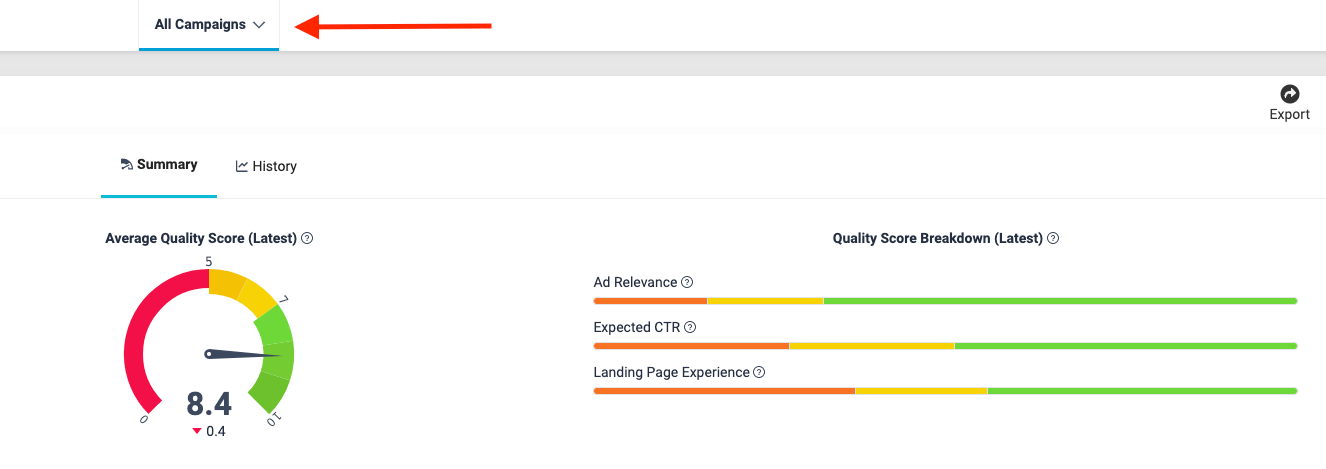
Select All Campaigns to see an overview at the campaign or account level. Scroll down to drill into Quality Score details for each campaign.
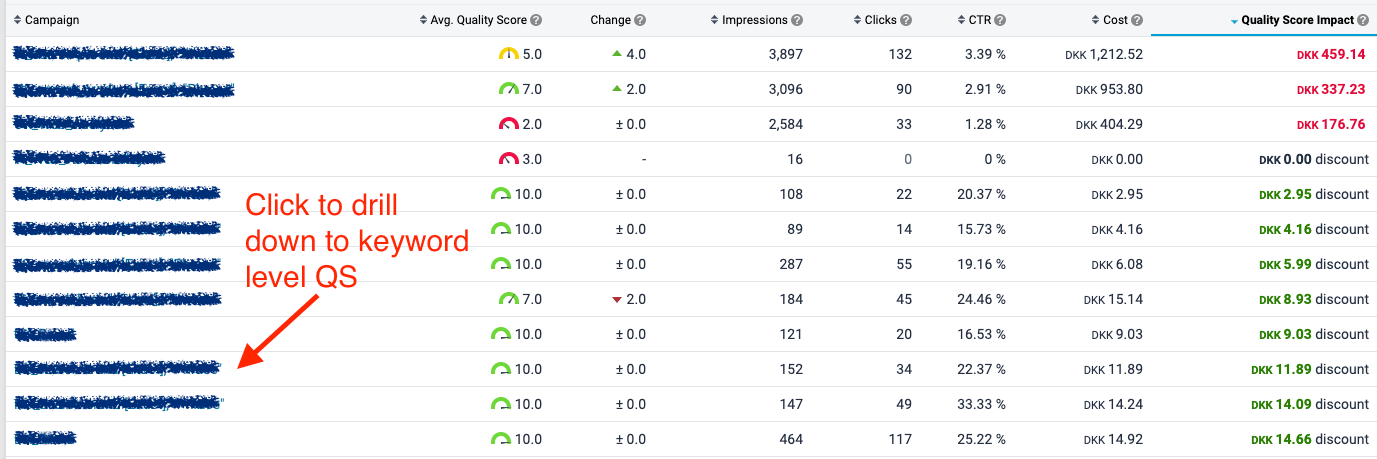
From here, you can click into a campaign to see Quality Score at the keyword level, including cost penalties or discounts:

Property operations company Camden used this view to see in real time how landing page fixes changed their Quality Scores. The team reported a 9% increase in Google Quality Score and 13% savings in ad costs and time for a subset of ads in one quarter. Read Camden’s story.
How to improve Quality Score, component by component
Start with the component rated below average. If you’re working on a single low-performing keyword, its three component ratings tell you which of the sections below to read first.
Improve ad relevance
- Write ads for tightly themed ad groups: Group keywords that share an intent, then write ad text that speaks to that intent. Structure alone doesn’t help. Google notes that moving keywords into new ad groups without changing the ad text or landing page has no effect on their quality. The gain in ad relevance comes from the more specific ad you can now write.
- Match the searcher’s language: Responsive search ads assemble headlines and descriptions to fit each search. Include headlines that use the language of your core keywords, and pin only when a message has to appear.
- Never forget search intent: Search intent is the why behind each search. Is the user looking for information, comparing options, or ready to buy? Keep that intent at the center of your ad groups, copy, CTA, and landing page.
- Give low-quality keywords their own ads: If a keyword underperforms, move it to an ad group where you can write ad text specifically for it.
- Use negative keywords: They keep your ads away from searches they’ll never satisfy, which protects ad relevance across the ad group.
Improve expected CTR
- Get really specific: Highlight your unique selling points, features, benefits, and price. Generic ads earn generic click-through rates.
- Work on ad strength: Google recommends aiming for “Good” or “Excellent” ad strength and replacing low-performing assets with new headlines and descriptions based on your best-performing ones.
- Use assets, with the right expectations: Sitelinks, callouts, and structured snippets make ads larger and more useful, which helps real clicks and Ad Rank. Google normalizes expected CTR for factors like position and ad assets, though, so assets won’t directly raise the expected CTR rating.
- Test different CTAs: Use your responsive search ad assets to test calls to action that match what the landing page delivers.
Improve landing page experience
Landing page experience is the one component the PPC team often doesn’t control. In most large organizations, the people writing ads and the people who own the website are on different teams, so a below-average landing page experience rating is usually a coordination problem as much as a technical one. Google also notes that information from its crawlers may be used to assess ad quality, so the page itself is being evaluated, not just how visitors behave on it.
- Deliver what the ad promised: Landing page experience starts with relevance. Align the page’s headline, benefits, and CTA with the ad and the search intent behind it.
- Keep it simple: Use one clear CTA, keep the content succinct, simplify forms, and make it easy to navigate to other pages on your site.
- Make it fast: Slow pages frustrate visitors before they read a word. Google’s page experience signals are a useful checklist for what “fast and usable” means.
- Think about mobile: According to Google, the user’s device is taken into account when ad quality is calculated. Make sure information is easy to find and navigation is intuitive on a phone.
- Don’t keyword stuff: Use your keywords where they help the reader, then focus on solving their problem.
- Test different landing pages: Experiment with layouts and copy so you can improve at a granular level.
What doesn’t improve your Google Ads Quality Score
Several long-standing tactics don’t move Quality Scores, according to Google’s own documentation:
- Changing match types: Quality Score is based on historical impressions for exact searches of your keyword, so switching match types won’t change it. That’s also why single-keyword ad groups split by match type no longer earn their keep.
- Restructuring for its own sake: Renaming campaigns or splitting ad groups without changing the ads or pages has no effect on quality.
- Bidding for a higher position: Expected CTR is normalized for position, so a top spot doesn’t raise the rating.
- Running branded campaigns to lift other keywords: Quality Score is calculated per keyword, so a brand term’s high click-through rate doesn’t raise the Quality Scores of your other keywords.
Quality Score FAQ
What is a good Google Ads Quality Score?
Google doesn’t define one. A more useful test is whether any of the three components is rated below average, because that’s where the improvement is.
Does a higher Quality Score lower my cost per click?
Not directly, since Quality Score isn’t used in the auction. Better auction-time ad quality, which Quality Score summarizes, generally leads to better positions and lower costs.
How does Quality Score relate to Ad Rank?
Ad Rank is calculated live in every auction from your bid, ad quality, and the search context. Quality Score is a separate, after-the-fact diagnostic of the ad quality part. To understand how paid and organic search work together, see our guide to integrated search marketing, or start with the basics of search engine marketing.
Key takeaways
Treat Quality Score as a diagnostic, not a target. If a keyword needs work, start here:
- Find the component rated below average before changing anything
- Improve ad relevance by writing specific ads for tightly themed ad groups and the intent behind them
- Lift expected CTR with specific copy, stronger ad strength, and assets
- Bring the website team in on landing page experience, and keep pages relevant, fast, and easy to use on mobile
- Skip tactics that change structure or match types without changing what the searcher sees